In my last post I introduced the personal assistant I’m writing. I wanted to detail out the first phase of the project – getting OmniFocus to sync with Google Calendar.
There are a few key items involved here:
- Serverless Design (Google Cloud Functions in my case)
- OmniFocus iCal instance
- Google Calendar
I’ll start with Serverless Design. I encourage you to check it out if you haven’t already done so. AWS calls their service Lambda, Google Cloud calls it Functions. The concepts are the same. The name is a little misleading, as in both cases there is a compute instance that is running. However, you don’t have to manage it. Think about that for a moment. You don’t need any DevOps to manage your containers, server deployments, patches, the list goes on and on. That frees you to simply write your event-driven application. I’ll get into more detail in a bit.
Next up is OmniFocus. This is my productivity tool. I haven’t had much exposure to other competitors, so I can’t compare, but my somewhat biased view says that OmniFocus is great, provided you are Apple-based. There are some pretty cool hacks you can do with Alexa, IFTTT, and Gmail labels that I may blog about in the future.
Finally, there is the all-powerful Google Calendar. If OmniFocus is the cockpit from which I can pilot my actions list, Google Calendar is the engine powering the experience. The available API to hook into and trigger notifications is a perfect compliment to the event-driven design philosophy behind Serverless architecture.
The Phase 1 Challenge
- OmniFocus uses an authentication method incompatible with Google Calendar
- Google Calendar requires user authorization, which in turn requires GUI interaction
- The authorization token has to accessible in a stateless environment
OmniFocus Authentication
Starting from the top, the whole point of Phase 1 is the incompatible Google Calendar subscription. In short, OmniFocus Sync Server uses a Digest Authentication scheme. This requires a client-server challenge response. This really isn’t something that Google has setup, which I can certainly understand. A scaling issue I can see with this for myself is how I can store the username/password in a secure fashion, but still have it accessible to the digest algorithm. Thankfully at the moment I don’t have to consider this.
One thing I encountered that had me puzzled was how I generated my digest. Authorization was generally new for me. The examples I had found showed a few of the digest variables listed as constants. But this got me rejected. I decided to pass back what was given to me, which included a few undefined variables. This worked.
Google Calendar Authorization
From here, it was a matter of solving the Google OAuth token generation. I planned to make a calendar sync microservice that triggered by a cron job. For the cron, I used a simple pub/sub setup, as described here. However, the service needs a valid token from Google, supplied by the user (me, in this instance) for this to work.
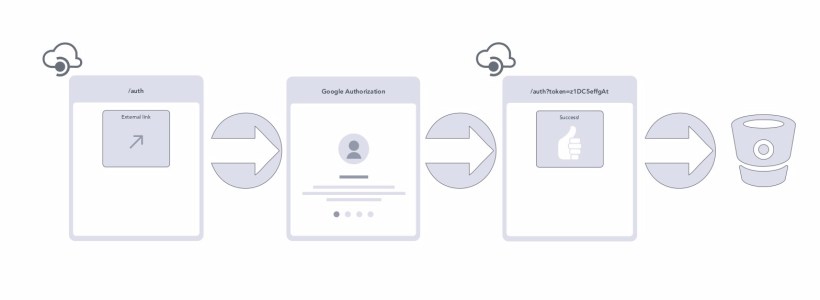
My challenge was how to provide the microservice with this token. “Being new at ___” is a running theme you’ll notice in this project. It was, to my embarrassment, a few days before it occurred to me that I could make a second microservice that was dedicated solely to granting authorization. Here’s the design:
As you can see, it’s a dead simple service. The Cloud Function is triggered by an HTTP API call. This generates the OAuth authorization link, which leads the user to Google’s authorization page. Once access is granted, the user is directed back to the Cloud Function, which can then handle the remaining details. Which leads to…
Accessing OAuth Token in a Stateless Environment
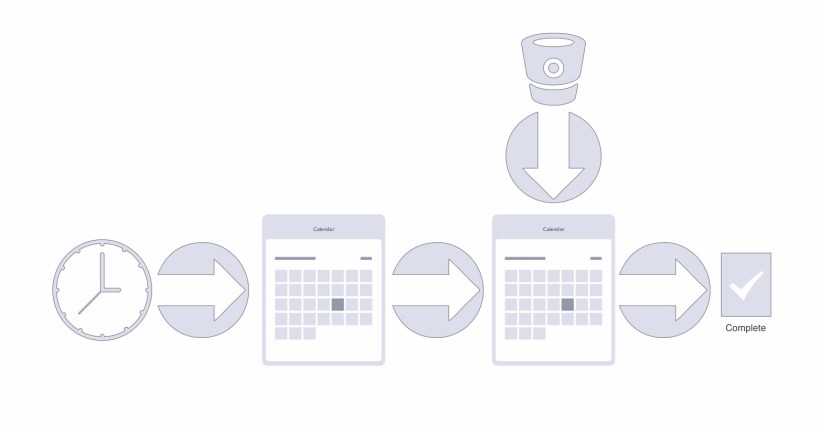
I haven’t experimented with whether multiple Cloud Functions share the same filesystem directories. I have a feeling that they don’t. For the calendar sync service, though, I needed a means to access the OAuth token I was granted in the Auth microservice. I solved this by using a Cloud Storage bucket.
Honestly, after it occurred to me that I could use this, I felt rather foolish. It seemed so obvious after the fact. In a future iteration, I may actual use a NoSQL solution. Given that the OAuth token is a JSON Web Token (JWT), it fits well with a NoSQL datastore. I also have some ideas around how to use a hashing algorithm to uniquely identify a particular user, while still maintaining a level of anonymity.
Here are the execution steps, as diagramed above:
- The cron job triggers the Cloud Function
- The function retrieves the current OmniFocus iCal document
- I has the doc and check it against the previous hash to see if there has been a change before…
- Getting the list of Google Calendar events
- Filter the two calendars looking for:
- Items to Add (new Due Date items appearing in OmniFocus)
- Items to Delete (Due items that have been removed from OmniFocus)
- Items to Update (Due items that have had the date change in OmniFocus)
As you can see, OmniFocus is the source-of-truth. This helps simplify coordination, especially at this stage of development.
Serverless Design
Earlier I mentioned Serverless Design. I wanted to provide a little more detail, for those who are new to it. As I stated, you don’t have to spin up your own compute instance. You just write the code logic that’s needed for your specific execution case. There are a few things to consider:
- Cloud Functions/AWS Lambda are event-driven, meaning there has to be a trigger
- Triggers can be pub/sub, HTTP API calls, or even storage bucket events
- They are easy to write, and are backed by the highly scalable, highly available cloud services of Google and AWS
For my efforts I used Cloud Functions. Conceptually Functions and Lambda are the same, but there are a several notable differences:
- For some reason, Functions take a lot longer to deploy than Lambda – up to a minute vs near instance, respectively
- Functions provides a command line simulator, which can help with development
- One has a few language options with Lambda (C#, Python, Java, and NodeJS), while Functions only provides coding in NodeJS
- Lambda is also the more mature option with far more AWS services that can trigger a Lambda, including CloudWatch events, S3 changes, and even Alexa; Functions are only triggered via Pub/Sub, Storage Bucket changes, and HTTP API calls
Definitely take the time to explore both. With that said, though, one aspect that really attracts me to microservices, which serverless design is well suited to, is that you don’t have to go all in on a single solution. Some pieces could easily be built in Lambda, with others leveraging Functions, depending on what your application needs are.
So why do I even need this sync service?
If you’re keeping score, you may be asking why I’m even going through this trouble. One of the things I like about OmniFocus is that the calendar isn’t the way you would normally think of a calendar. When we setup some sort of reoccurring event – think a 1:1 with an employee, or a monthly reminder to pay some bill – it is on a somewhat fixed cycle. In other words, it will end up on your calendar on schedule all the time. That is useful for many things, but I wanted more flexibility.
I can set OmniFocus to add a due item to my calendar on a reoccurring bases only after I have completed the current task. For the hair appointment application, this is an important feature. It means that if I’m delayed for some reason, say because I was out on vacation or business, then the next scheduled appointment won’t be added to my calendar before I’ve completed this current one.
OmniFocus, however, does not have any means to trigger any specific alarm. This is where Google Calendar comes in. Through the extensive API that Google provide, I’m able to listen for a specific calendar alarm to trigger, using this as my queue that the appointment service should run.
And because OmniFocus is the “source of truth”, if I do my weekly review, as a good GTD student should, I need to move out the appointment, the sync service will pick this up and move my calendar event accordingly.
In short, leveraging the OmniFocus-Google Calendar combination provides me a much finer grain way to control when my digital assistant takes action on my behalf than a standard cron job would give.
Up Next
Now that I have Phase 1 humming along, Phase 2 will introduce the core of the project. In this phase the service will respond to the event reminder. I will create a simple business rule that says, “Look at my next N-days and only book appointments between these times, excluding Sundays or Mondays.” I’d like to include holidays in that, but will probably make that for a future date. Once I get available time slots, the service will generate an email and send it off to my stylist.
Stay tuned for more!
 Daniel Konopacki